Supercharge your
Chat Experience
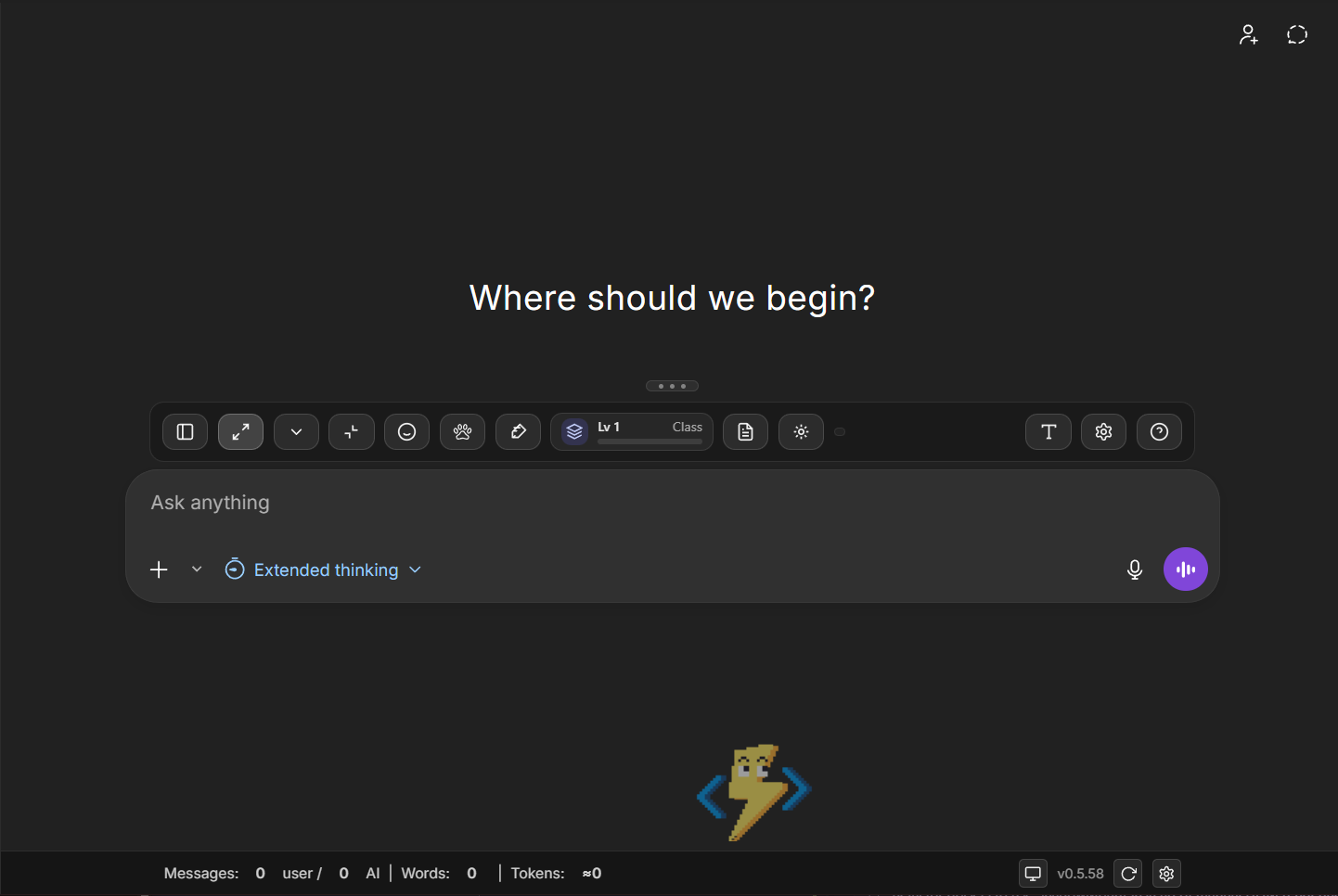
Sidecar is the productivity toolbox for ChatGPT: a smart dock, wide mode, token tracking, macros, and code tools built right into your interface.
More than just a dock
Inject some personality into your workflow. Who said productivity has to be boring?
VS Code Pets
Bring joy to your workflow with your favorite VS Code pets living in your sidebar.
Progress Quest
Track your RPG stats and progress automatically as you chat and complete tasks.
Modular Downloads
Customize your Sidecar installation. Select the components you need to keep your footprint small.
Sidecar Core
RequiredEssential runtime and dock functionality.
VS Code Pets
Virtual companions for your sidebar.
Progress Quest
RPG progression system tracker.
Local Analytics
Advanced charts and usage statistics processing.
Power tools for power users
Everything you need to manage your AI conversations more effectively, built directly into the interface you already use.
Smart Dock
A persistent sidebar dock for instant access to your favorite tools and settings without cluttering the UI.
Sidebar Toggle
Effortlessly toggle the main conversation sidebar to focus purely on your chat content.
Wide Mode
Break free from the centered narrow view. Expand the conversation to utilize your full screen width.
Input Control
Resize or collapse the input area to view more of the conversation history at once.
Code Superpowers
Collapsible code blocks for better readability and instant HTML previews for web developers.
Prompt Library
Save frequently used prompts and access your recent history instantly. Never re-type the same context.
Live Status Bar
Real-time tracking of token usage, word count, and estimated API costs at a glance.
Model Switcher
Relocated model picker in the dock for faster switching between models.
Custom Typography
Personalize your reading experience by changing font families to System or Google Fonts.
Full Config
Deep customization of extension behavior with import/export capabilities for your settings.
How it works
Three steps. Minimal drama. Your browser thanks you.
Install from your store
Add Sidecar from Chrome Web Store, Edge Add-ons, or Firefox Add-ons. (Links are placeholders until you ship.)
Enable it on ChatGPT
Open ChatGPT and toggle Sidecar on. If it’s enabled, it’s available. No pinning ritual required.
Run macros + commands
Use Ctrl+K to open the command palette. Save macros, replay flows, and keep your hands on the keyboard.
Macros that actually help
A command palette + macro store designed to automate your workflow without hijacking ChatGPT’s composer.
Command Palette (Ctrl+K)
Type commands in Sidecar’s palette input only. No slash-command hacks in the native composer, no IME breakage.
Macros + Flow Scripts
Save, share, publish, and run macro automation scripts that feed into your Flow engine (flow.ts).
Terminal-like History
Up/Down cycles your recent commands like a shell. Persisted in chrome.storage.local and capped to keep it sane.
Token estimates, lazily
Cache per thread, refresh in idle time, and avoid re-tokenizing the universe on every mutation.
Roadmap bits (the “nice to have” pile)
A few of the bigger upgrades that fit your spec. These are landing-page bullets, not promises.
Page title cleanup
Strip “ChatGPT - ” from the tab title when running in the extension context.
Popover UX
Popovers close on outside click and on actions inside them.
Grab handle animation
Cute micro-handle that expands on hover and animates smoothly.
Prompt recall in composer
Up-arrow previews recent prompts; Right-arrow inserts full prompt.
Scroll + wide mode safeguards
Stop auto-scroll to bottom optionally; fix wide-mode overflow on long prompts.
Message collapsing
Collapse long chats with preview + char count; auto-collapse on send over X chars.
Your code blocks
Detect ``` in your messages, render styled blocks, syntax highlight, click-to-copy.
Font scaling
Scale Sidecar UI without changing browser zoom.
Ready to upgrade your workflow?
Build it in public, ship it fast, and let your users bully it into greatness.
View GitHub / SourceAvailable on all major browsers
Frequently Asked Questions
Everything you need to know about Sidecar and browser extension compatibility
What is Sidecar for ChatGPT?
Sidecar is a productivity toolbox and dock that enhances your ChatGPT experience with features like a persistent sidebar, wide mode, token tracking, macros, and code tools - all built directly into your ChatGPT interface.
Is Sidecar free to use?
Yes, Sidecar is completely free and open source. We believe productivity tools should be accessible to everyone without cost barriers.
Does Sidecar work with all ChatGPT models?
Yes! Sidecar is compatible with all ChatGPT models including GPT-4, GPT-3.5, and any future models. The extension enhances the ChatGPT interface regardless of which model you're using.
How does Sidecar handle my data?
All your data (prompts, settings, macros) are stored locally on your device. We don't collect any personal information or track your usage. Your privacy is our priority.
What features does Sidecar offer?
Sidecar includes a smart dock sidebar, wide mode for expanded viewing, real-time token tracking, prompt library, code tools with collapsible blocks, model switcher, and customizable typography - all designed to supercharge your ChatGPT workflow.
How do I install Sidecar?
Simply install the browser extension from the Chrome Web Store or Firefox Add-ons. Once installed, Sidecar will automatically integrate with ChatGPT and enhance your experience with its productivity features.